
arrm_relooked_en:profile-scrape-en_relooked
Manage scrape profiles
Available since version 1.9.2.8 Beta 2
It is possible to create scrape profiles that contain ARRM specific settings.
To do this, simply configure ARRM as you wish and click on the Profile (Save/Load) button on the Database tab. The yellow information that appears below this button indicates the last profile loaded. Here: Screenscraper_Mix

When you click on this button, the following form appears:
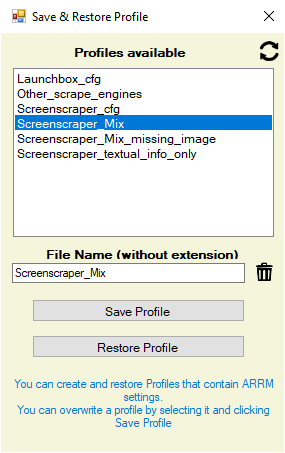
A list of existing profiles appears. You can :
- Replace an existing profile by selecting it and clicking Save Profile (All current ARRM settings will be saved)
- Create a profile name (without extension) and click on Save profile (All current ARRM settings will be saved)
- Restore a profile by selecting it and clicking on Restore profile
- Delete a profile by selecting it and clicking the Trashcan icon
The profiles are saved in the folder %appdata%\Nexouille Soft\arrm\Database\profile
WARNING
If you wish to share your profile with other users, it is imperative to check the small box (indicated by the red arrow), which will allow not to export your personal data such as your ARRM keys, API, screenscraper identifiers etc…
If your ARRM key is duplicated on multiple machines, it will be canceled.
If you wish to share your profile with other users, it is imperative to check the small box (indicated by the red arrow), which will allow not to export your personal data such as your ARRM keys, API, screenscraper identifiers etc…
If your ARRM key is duplicated on multiple machines, it will be canceled.
arrm_relooked_en/profile-scrape-en_relooked.txt · Dernière modification : de nexusone13