
arrm_relooked_en:grab_youtube_video_en_relooked
Ceci est une ancienne révision du document !
Retrieve a youtube video and associate it with a game
Since version In ARRM 2.0.2.7 Beta 5 it is possible to download a Youtube video (all or part) and associate it with the selected game.
This is done via the Youtube button in the 'Rom Informations' panel
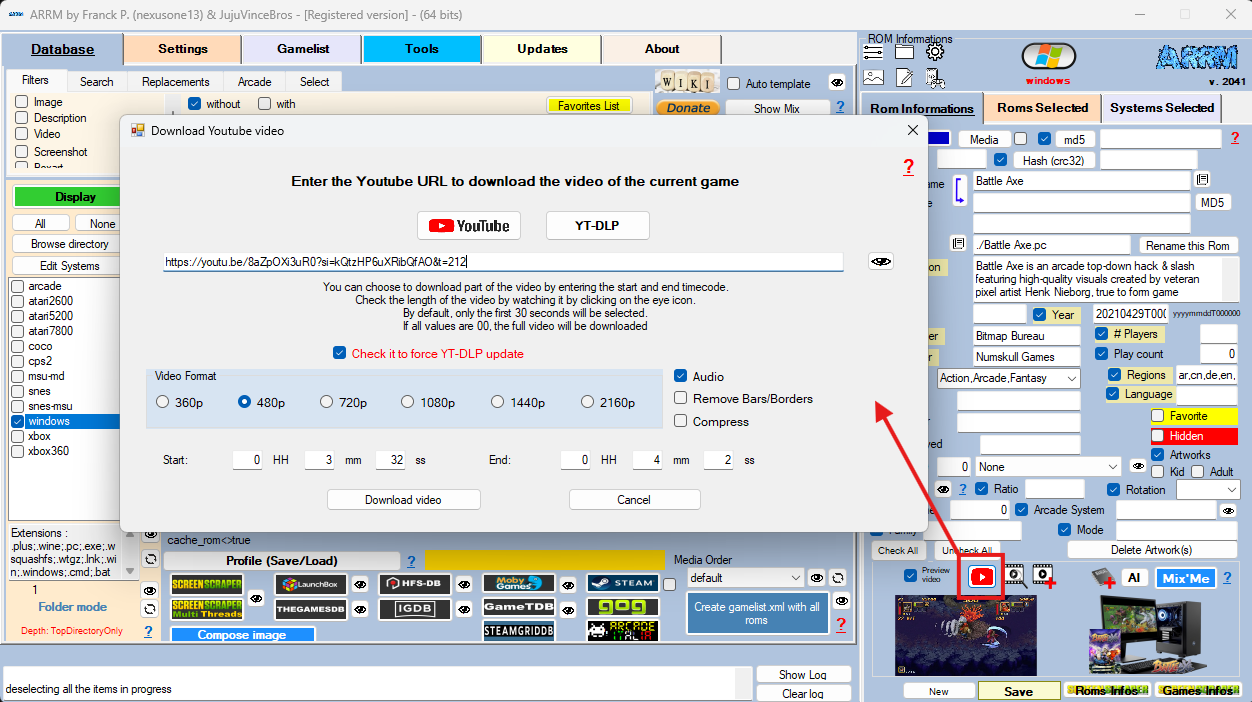
It is possible to choose the resolution, with or without audio, remove black borders and possibility to compress via ARRM's internal compressor.
You can specify the start time of the video with the t= argument in the url.
ARRM will automatically add 30 seconds to the end time. (example url: https://youtu.be/3FuEZ2gaVKw?si=8IrvxB1MYdbNdLEK&t=356)
Youtube Short videos are incompatible and produce an error message
Note from smashingblargharghar regarding YouTube videos :
“It REALLY doesn't like it when you use certain IP addresses from VPN providers because YT thinks you're a bot. If you're having trouble, disable VPN or switch IP's – but expect your new VPN IP to get blocked eventually.
If you mass download video's one after another too fast, you get flagged as a bot and it stops working
Video's that don't offer a 480p option simply don't seem to work. If you find a video with only 360p/720p as options, it's probably not going to download”
Note from smashingblargharghar regarding YouTube videos :
“It REALLY doesn't like it when you use certain IP addresses from VPN providers because YT thinks you're a bot. If you're having trouble, disable VPN or switch IP's – but expect your new VPN IP to get blocked eventually.
If you mass download video's one after another too fast, you get flagged as a bot and it stops working
Video's that don't offer a 480p option simply don't seem to work. If you find a video with only 360p/720p as options, it's probably not going to download”
arrm_relooked_en/grab_youtube_video_en_relooked.1771937918.txt.gz · Dernière modification : de nexusone13